


If you are studying at APJ Abdul Kalam Technological University, you already know the drill. Results come out, everyone panics, and suddenly every WhatsApp group is flooded with links that may or may not be the real portal. Let us cut through the noise and talk about what the KTU login portal actually is, how to get into it, and what to do when it inevitably breaks on result day.
What Is This Portal Anyway?
The official KTU student portal lives at app.ktu.edu.in. That is it. Do not trust the random links your classmates send you. The university runs everything through this one site — student logins, college logins, and the university admin side. As a student, once you are inside, you can see your results, attendance, how many credits you have scraped together, your internal marks, and pretty much every academic record the university has on you. You can also download your mark list and grade sheet, which you will need when you apply for higher studies or internships and suddenly realize you do not have a physical copy.
How to Actually Log In
Okay, here is the part that sounds simple but somehow trips everyone up.
First, open your browser and type app.ktu.edu.in. Not some variation of it. The exact URL. Bookmark it so you stop clicking shady links from group chats.
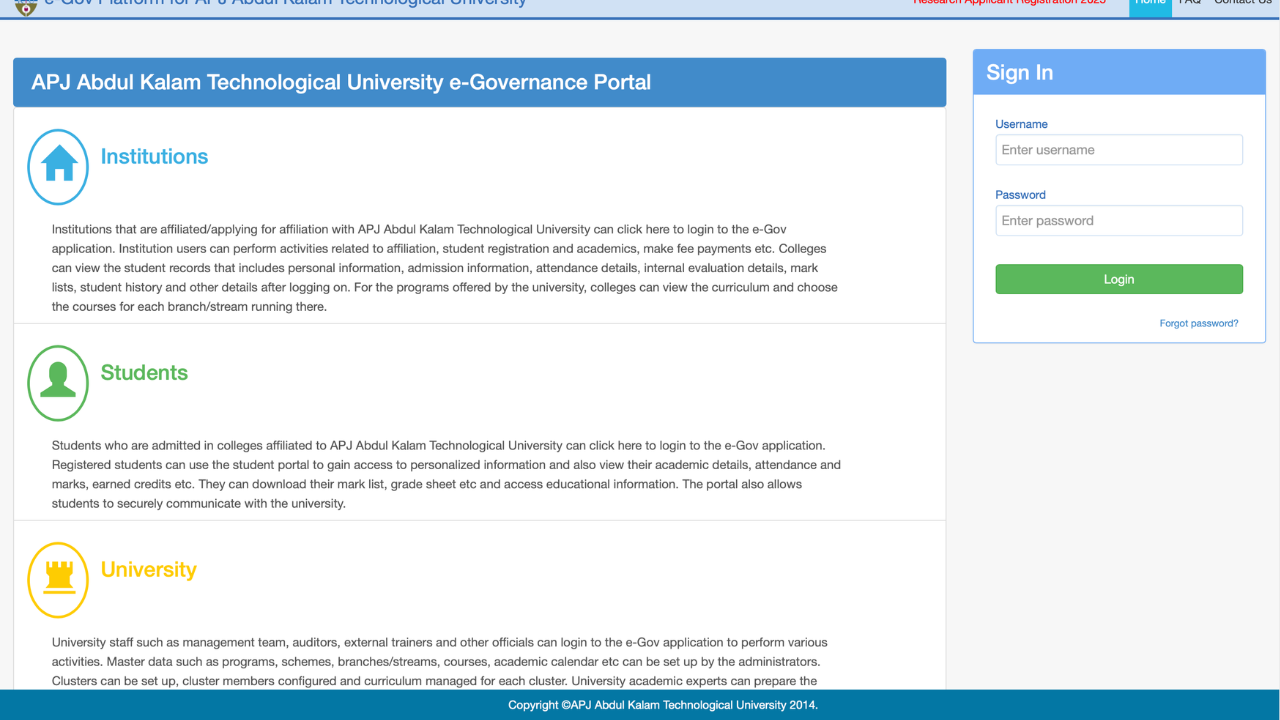
Once the page loads, look for the student login section. You will need your username and password. For most people, the username is your university roll number or registration number — the one you got when you first joined. The password is either something you set up yourself or something your college gave you during admission. If you have never logged in before and have no idea what your password is, just walk over to your college exam cell or admin office. They deal with this every single day and will sort you out in five minutes.
After you punch in your details and the captcha, you are in. That is it. No magic required.
What Can You Actually Do Inside?
Once you are past the login screen, the dashboard shows you pretty much everything. Your personal details are there, your admission info, and then the stuff you actually care about:
Exam results — This is the big one. The moment results are announced, this is where they show up first. No need to wait for your college to put up a PDF on a notice board.
Attendance — KTU is pretty strict about attendance, and this page tells you exactly where you stand in each subject. If you are cutting it close, you will know before it is too late.
Credits — The credit system can be confusing, but the portal breaks it down semester by semester so you know if you are on track to graduate.
Grade sheets and mark lists — You can download these anytime. Super handy when some company or university abroad asks for a copy and you have no idea where your physical one is.
Internal marks — Your sessionals, practicals, and whatever else your college has been grading you on. If something looks off, at least you can catch it early.
Read Also: MCA Master Data & ROC Records: A Practical Guide for Indian Businesses
The Stuff That Always Goes Wrong
Let us be real — this portal is not exactly Google. It has its moods.
- Forgot your password- Happens to the best of us. There is a forgot password link on the login page. Click it, enter your registered email or phone number, and reset it. If that does not work, your college admin can reset it for you. Just do not keep trying random passwords or you might get locked out.
- The site just will not load — Yeah, this is classic. During result season, half of Kerala is trying to log in at the same time. The servers basically give up. Try early in the morning or late at night when fewer people are awake. Switch browsers, clear your cache, or try your phone instead of your laptop. Sometimes one of them just works better for no reason.
- Credentials not working — Make sure you are typing your university roll number, not your college ID. They are different things and it is an easy mistake to make. If you are sure you have the right number and it still does not work, your college probably has not activated your account yet. Go talk to them.
- Your attendance or marks look wrong — Do not email the university directly and expect a fast reply. Your college uploads most of this data, so go to your department first. They can fix it way quicker than anyone at the main office.

A Few Things You Should Actually Do
Log out when you are done. I know it sounds like something your dad would say, but if you are using a college computer or some random laptop at a cafe, just log out. Also, do not give your password to your friends so they can “check your results for you.” It never ends well. Keep your registered email and phone number updated in the portal too, because that is where all the official notifications land. And please, for the love of everything, bookmark the real site. Stop clicking links from WhatsApp.
Final Word
The KTU login portal is basically your academic lifeline. It is not the prettiest website out there and it definitely has its frustrating moments, but once you know how to use it, life gets a lot easier. Check your results from your bed, download your grade sheet at 2 AM, and keep an eye on your attendance before it becomes a problem. Just stick to the official site, keep your login details to yourself, and when in doubt, your college admin office is your best friend.
Read More: What Is SDMS IOCL? A Simple Guide for Indian Oil Dealers
